
Voypelo Solutions WhatsApp us

Free template · for drilling contractors

Daily drilling report template, with the checks built in.

A free Excel sheet for your daily drilling reports. Type each shift in once and it works out the metres from the depths, metres per hour and water per metre. Any report that doesn't add up turns red, with the reason beside it.

Free for up to 3 rigs and 40 reports. Works in Excel, Google Sheets and LibreOffice.
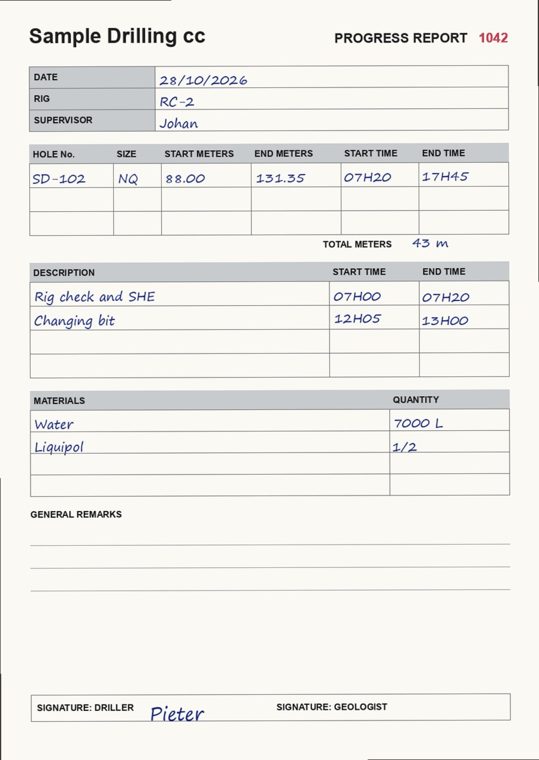
A made-up drill progress report, filled in by hand
Sample rowFrom is not where the hole's last report ended

What is in it

Four tabs, ready to use.

Rigs

One row per rig, named the way your crews write it.

Daily report

One row per rig per shift: hole, from and to, metres, drilling and standby hours, bit, water and signatures.

Per rig

Shifts, metres, metres per hour, standby hours and water per metre for each rig.

How to use

Three steps, and what turns a row red.

What it looks like

Eight made-up reports, checked.

DateRigHoleFrom (m)To (m)WrittenCheck
2026-10-26RC-1SD-101156.50212.4055.90OK
2026-10-26RC-2SD-10240.0088.0048.00OK
2026-10-27RC-1SD-101212.40268.1055.70OK
2026-10-27RC-2SD-10288.00131.3543.00Metres written do not match From and To. Geologist has not signed.
2026-10-27RC-3SD-1040.0018.2018.20Standby hours with no reason.
2026-10-28RC-3SD-10420.0061.4041.40From is not where this hole's last report ended. Supervisor has not signed.
2026-10-28RC-4SD-1050.0030.0030.00Rig not on the Rigs tab.
2026-10-28RC-1SD-10350.0045.00To is not deeper than From.

These are the example rows in the template. Delete them before you start.

What turns a row red

The mistakes that cost a drilling invoice.

  1. Metres that don't match

    The metres written don't match To minus From, or To is not deeper than From.

  2. A gap in the hole

    The report doesn't start where the same hole's last report ended.

  3. Standby and signatures

    Standby hours with no reason, no supervisor signature, or the geologist marked as not signed.

Excel template

Download the template.

Rigs, Daily report and Per rig tabs for up to 3 rigs and 40 reports, with the checks built in and red rows marked automatically.

Done for you

Rather not type the reports at all?

Your supervisors WhatsApp a photo of each progress report, toolbox talk and rig check. By 7 the next morning your office has one Excel sheet with these same checks, the safety papers included, and a person looking at every red row.

Questions

Daily drilling reports, plainly.

What is a daily drilling report?

The paper the driller or supervisor fills in every shift: rig, hole, depth from and to, metres drilled, drilling and standby hours, bits, water and consumables, signed by the supervisor and often the geologist. It is the record the client pays on.

Do I need Excel?

The template works in Excel 2019 or later, Excel online, Google Sheets and LibreOffice.

What does each check catch?

Metres written that don't match the depths is a typing or adding error, and it changes the invoice. A report that doesn't start where the hole's last one ended means a missing shift or a wrong depth. Standby with no reason is hard to bill. A missing signature can hold up payment.

Is it free?

Yes, for up to 3 rigs and 40 reports. That suits a small contractor or trying it out. A bigger operation is better off with the reports typed up for them every morning.

Does it cover safety papers?

This template covers the drilling report. Toolbox talks, risk assessments, PPE checks and rig inspections are part of the done-for-you service.

Is my information sent anywhere?

The sheet runs on your own computer. Only the download form sends your name and WhatsApp number to us.

Can someone type the reports up for us?

Yes, that is what we do. Supervisors WhatsApp a photo of each paper, and by 7 the next morning your office has one Excel sheet with these same checks and a person looking at every red row.