
Free tool · Fleets
Fuel reconciliation template: check your diesel slips free.
Paste your trucks and a month of slips below and see which fills don't add up, right here in the browser. Or download the same checks as an Excel template.
Free tool · Fleets
Paste your trucks and a month of slips below and see which fills don't add up, right here in the browser. Or download the same checks as an Excel template.
Time it
Type this made-up slip the way your office would. The clock starts at your first key and stops when you press Done.
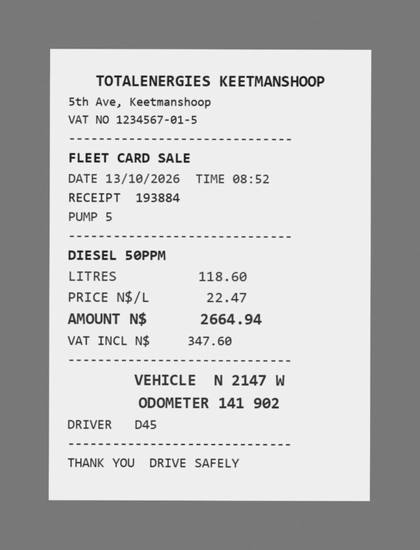
With Alpecca
Three made-up slips the way our checking turns them into rows: one fill too big for the tank is marked red, with the reason beside it.
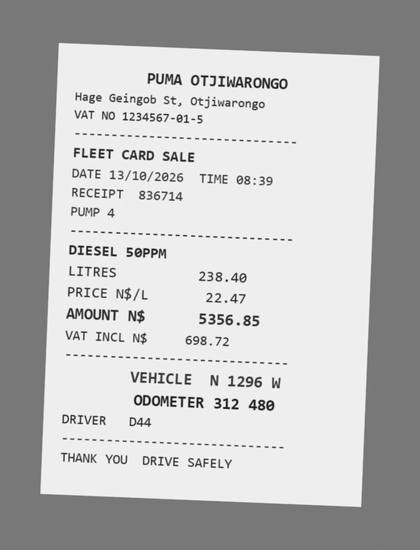
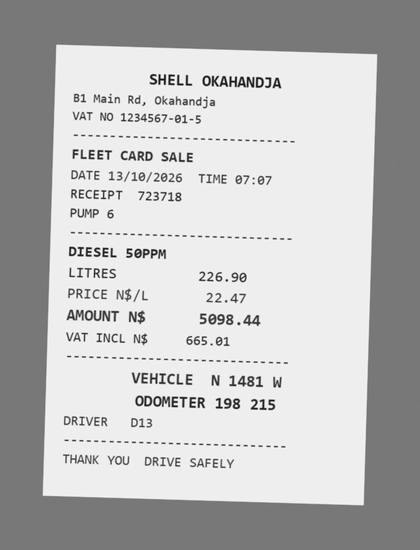
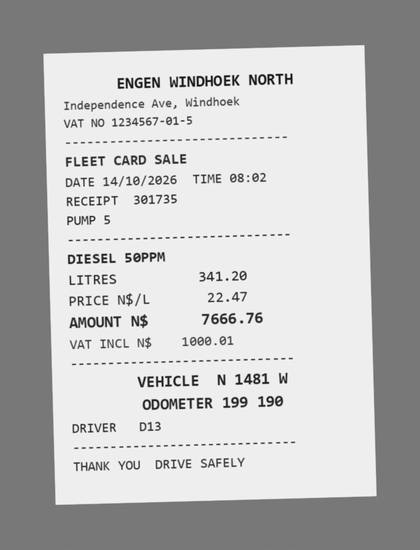
| Slip | Vehicle | Litres | Km since last | Check |
|---|---|---|---|---|
| S01 | N 1296 W | 238.4 | OK | |
| S02 | N 1481 W | 226.9 | OK | |
| S03 | N 1481 W | 341.2 | 975 | 341.2 L into a 300 L tank |
Made-up slips. Your real sheet arrives before 7 the next morning, one tab per truck, and a person checks every row against its photo.
Online checker
Copy the columns from Excel or Google Sheets and paste them in, or type them with commas. The examples are made up; replace them with yours. Free for up to 10 slips a check and 3 checks a month.
Nothing you paste leaves this page. It is kept in this browser only, so it is still here if you come back.
The checks
A wrong slip, a fill split between trucks, or diesel that went somewhere else.
One fill claimed twice. Both rows turn red so you can see the pair.
Sometimes fine on a long trip; always worth one question.
A reading keyed wrong at the pump or on the sheet.
Measured from the last fill, so a pattern shows up the same week, not at month end.
A typing error, or a slip that does not add up on its own.
A plate written one character off books the fill to a truck that does not exist.
Excel template
Fleet, Slips and Per truck tabs for up to 5 trucks and 50 slips, with the checks built in and red rows marked automatically. Works in Excel 2019 or later, Excel online, Google Sheets and LibreOffice.
Done for you
Your drivers WhatsApp a photo of each slip, and by 7 the next morning your fuel sheet comes back checked, one tab per truck, with these same checks and a person looking at every row.
Questions
Matching every diesel slip to a truck, its odometer and its tank, so each fill can be explained: the right truck, a sensible number of litres, the right amount, and km per litre close to that truck's usual. Anything that does not match is a question for the driver while the trip is still fresh.
No. The checker on this page runs in your browser. The download works in Excel 2019 or later, Excel online, Google Sheets and LibreOffice.
No. What you paste into the checker stays in this browser. Only the download form sends your name and WhatsApp number to us.
More litres than the tank holds points to a wrong slip or diesel going elsewhere. The same slip twice is a double claim. Two fills in a day and a low km per litre are worth asking about. Litres times price not matching the amount is a typing or slip error.
Yes, for up to 10 slips a check and 3 checks a month online, and up to 5 trucks and 50 slips in the Excel template. That suits a small fleet or trying it out. A bigger fleet is better off with the slips checked for them every morning.
Yes, that is what we do: drivers WhatsApp each slip and by 7 the next morning your sheet comes back checked, one tab per truck.